
Medical centre
Several specialties and doctors in one place. The patient starts from a category, such as internal medicine, and reaches a specific service.
Websites for clinics and practices
A website for a medical centre, clinic, dental practice or physiotherapy studio. The patient chooses a service, a specialist and a free time. The booking lands in the list with a number, a status and a total.
Who it is for
The booking flow is the same. The emphasis follows how the practice works.
Patients look for a doctor in the evening or on a break. If the site only shows a phone number, the call waits for reception: who is free, how long the procedure takes and what it costs. When visits live in a notebook or a spreadsheet, two people can easily take the same time.
The patient goes through the service, the date and their details, without waiting for reception to be open.
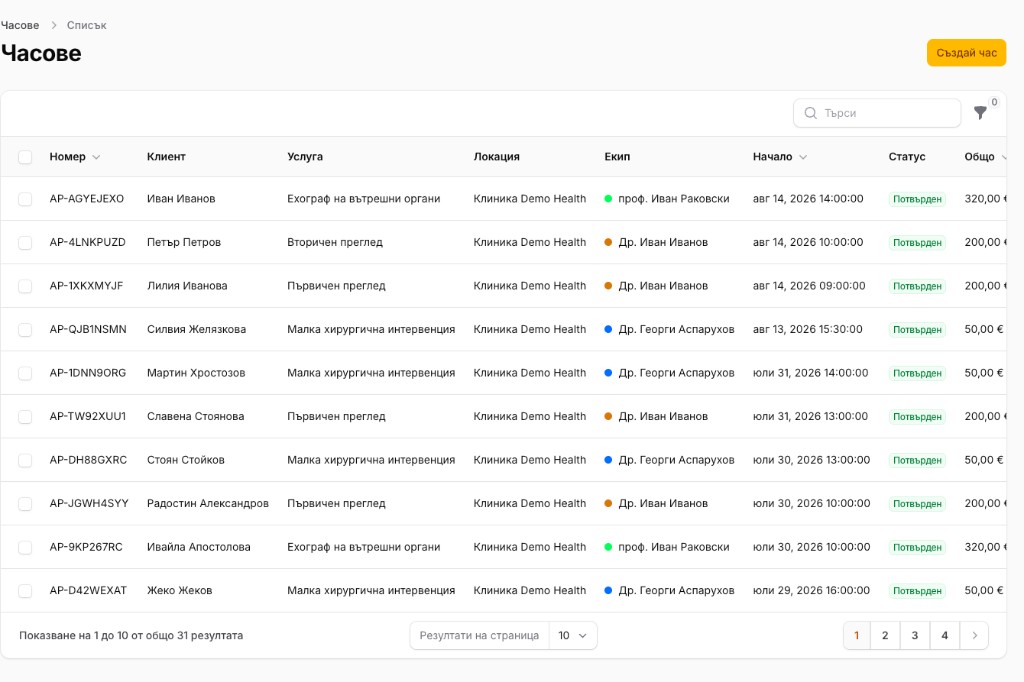
Number, client, service, location, doctor, start, status and total sit in one table.
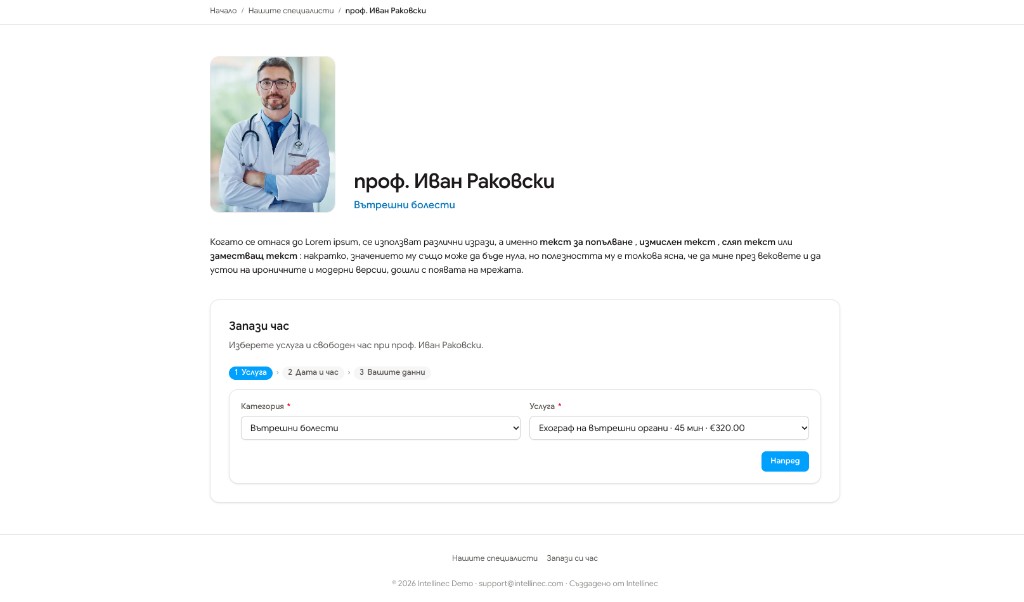
The service carries its duration and price in the first step, for example 45 min and €320.
For the patient
The same flow as the “Book a visit” screen.
The patient opens the specialist’s profile and chooses a category and a service. The list shows the name, the minutes and the price.
After the service, they pick a free day and time with that specialist.
They leave a first name, a last name, an email and a phone number, and can add a note. The patient’s language is stored on the visit, so reception knows which language to use.
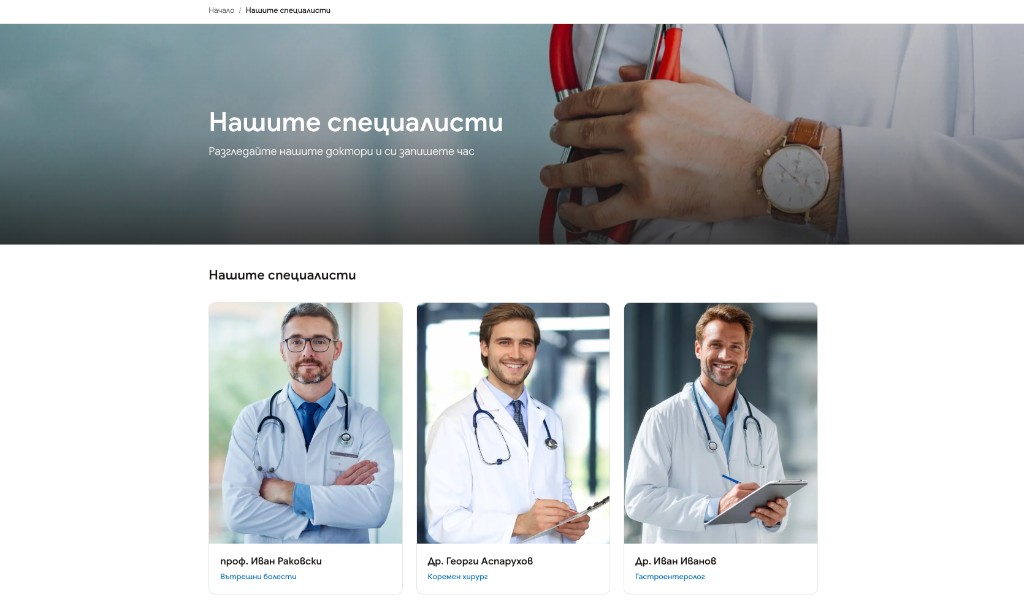
Above the steps is the profile: photo, name, specialty and a short text. Before that, the patient has come through “Our specialists” and chosen a person, as well as a service.
For the team
In the admin, visits sit in one table. Search and filters collect the rows you need. Reception can also enter a visit when the patient has called.
Columns in the list: number, client, service, location, team, start, status, total.
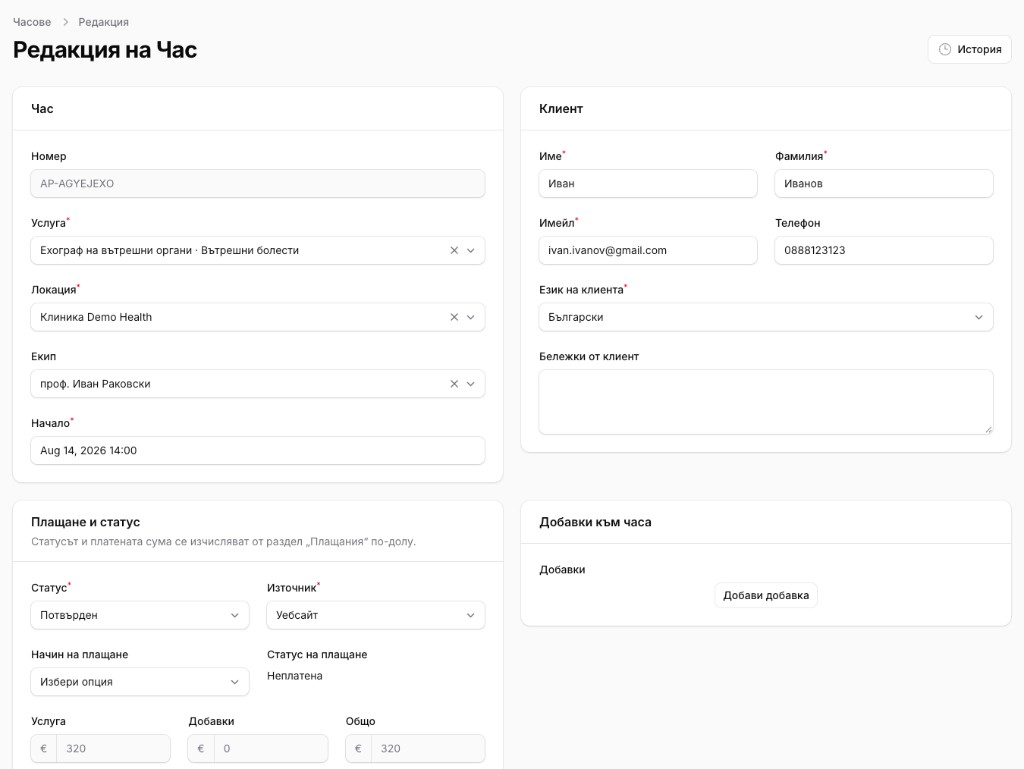
The service is tied to its category, for example “Abdominal ultrasound · Internal medicine”.
The location and the team member are chosen for this visit.
The status shows whether the visit is confirmed.
The source shows where the booking came from, for example the website.
Method and status sit apart: paid or unpaid.
An add-on on the visit goes into the total. Service, add-ons and total are three separate fields. History keeps what changed.
The site is built around your brand. The modules below are the ones a practice uses every day.
A list with photo, name and specialty. Each card opens a profile.
The patient reads who they are booking with, before choosing a service.
Services sit under a specialty, with a duration and a price.
Three steps: service, date and time, patient details.
The visit is tied to a specific clinic or practice.
In the list each specialist has a colour, so the schedule is easier to read.
A confirmed visit is visible in the list, without opening the card.
The visit keeps the service amount, the add-ons, the total and whether it is paid.
An extra service on a visit that is already booked, with its own price.
Reception creates a visit from the same screen when the booking did not come through the site.
Services, team, contacts and text the team changes itself.
From the shared modules, when you want them: a blog, more languages, an SMS reminder and online payment. They are included only if the practice will use them.
A new specialist, a new service or a new price does not wait on a developer. After the training, the team edits profiles, categories and visits. We take the build, the launch and the care after that.
In the consultation we go through the specialties, the doctors and the locations. After it you receive a scope and an offer.
Questions
This is the practice website and the place where visits are booked and arranged. The medical record and the reports to the national health system stay in your own software.
The visit stores the price, the add-ons and the payment status. Online payment is added separately, when you want the amount to go through the site.
Yes. The “Create visit” button opens the same record, with location, team, patient and total.
In the first step the service shows its duration and price. On the visit card the amount is split into service, add-ons and total.
Yes. Every visit has a location. The list can be filtered by it.
Your team, from the panel. We show that before launch.
The timeline goes into the offer. It depends on the number of specialists, services and languages, and on when the text and photos are ready.
You get a clear direction for building the project and which practices to introduce, because we know the business, not only the technology.